Use cases
Most people who search for a way to merge Google calendars want one of three things: to see every account in one place, to let people in one account see that they are busy in another, or to stop double bookings on their booking links. Google Calendar handles the first two for free. This guide covers Google's own options first, explains where they stop, and then shows where a scheduling app such as Meetingpad fits. Meetingpad's founder wrote it.
Viewing means you see the events from several accounts in one calendar. It changes what you see, not what anyone else sees.
Sharing busy time means people who schedule from one account can tell that you are already busy because of a meeting in another account. This is what most work and client setups need.
Copying means duplicating events from one account into another. Google Calendar's sharing doesn't do this: a shared calendar stays owned by the original account and simply shows up in the other one. Copies need a separate tool, and each copy is one more thing to keep up to date when a meeting moves or is cancelled.
Decide which of the three you need before you change any settings. The steps below go from the simplest to the most involved.
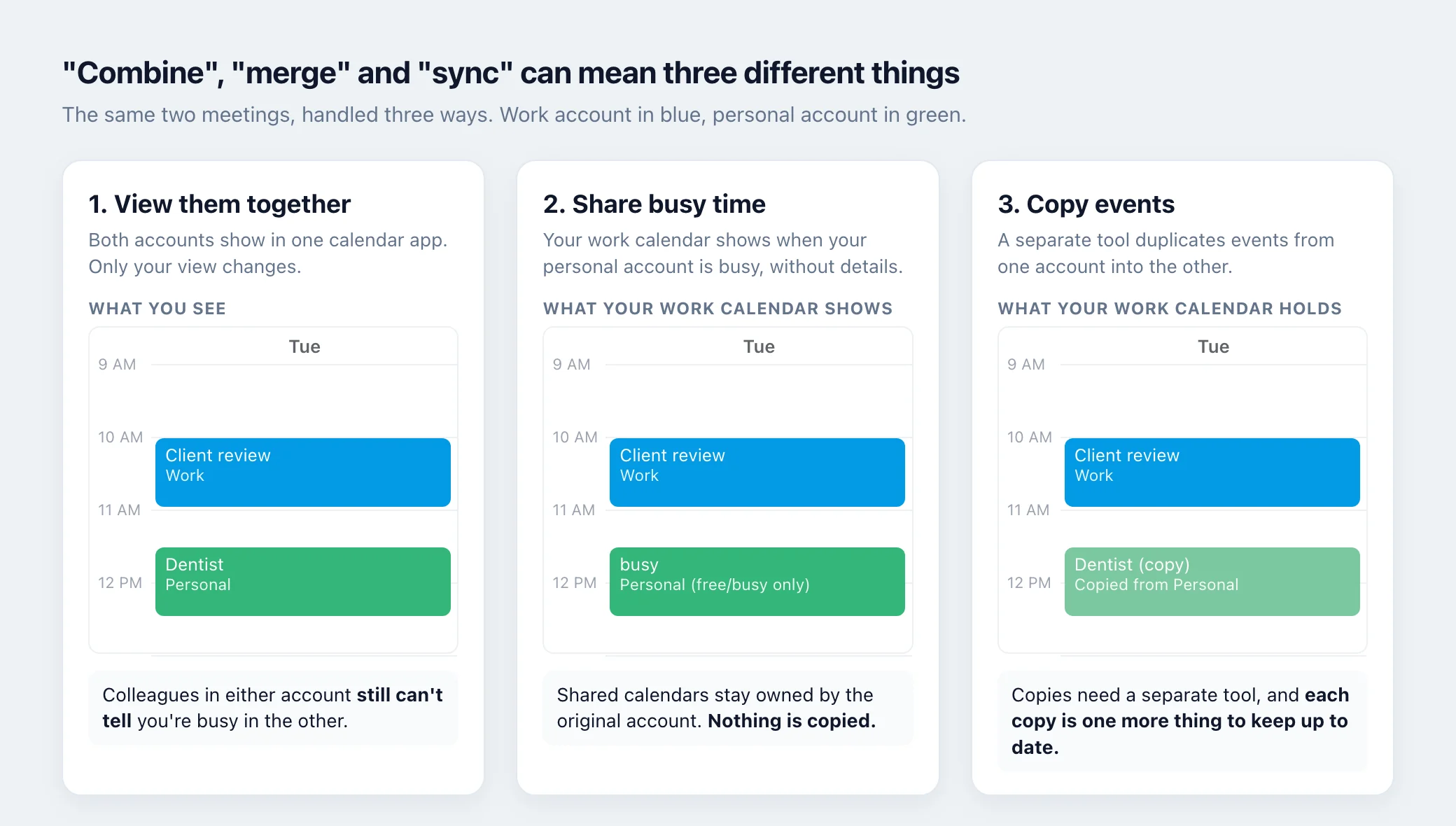
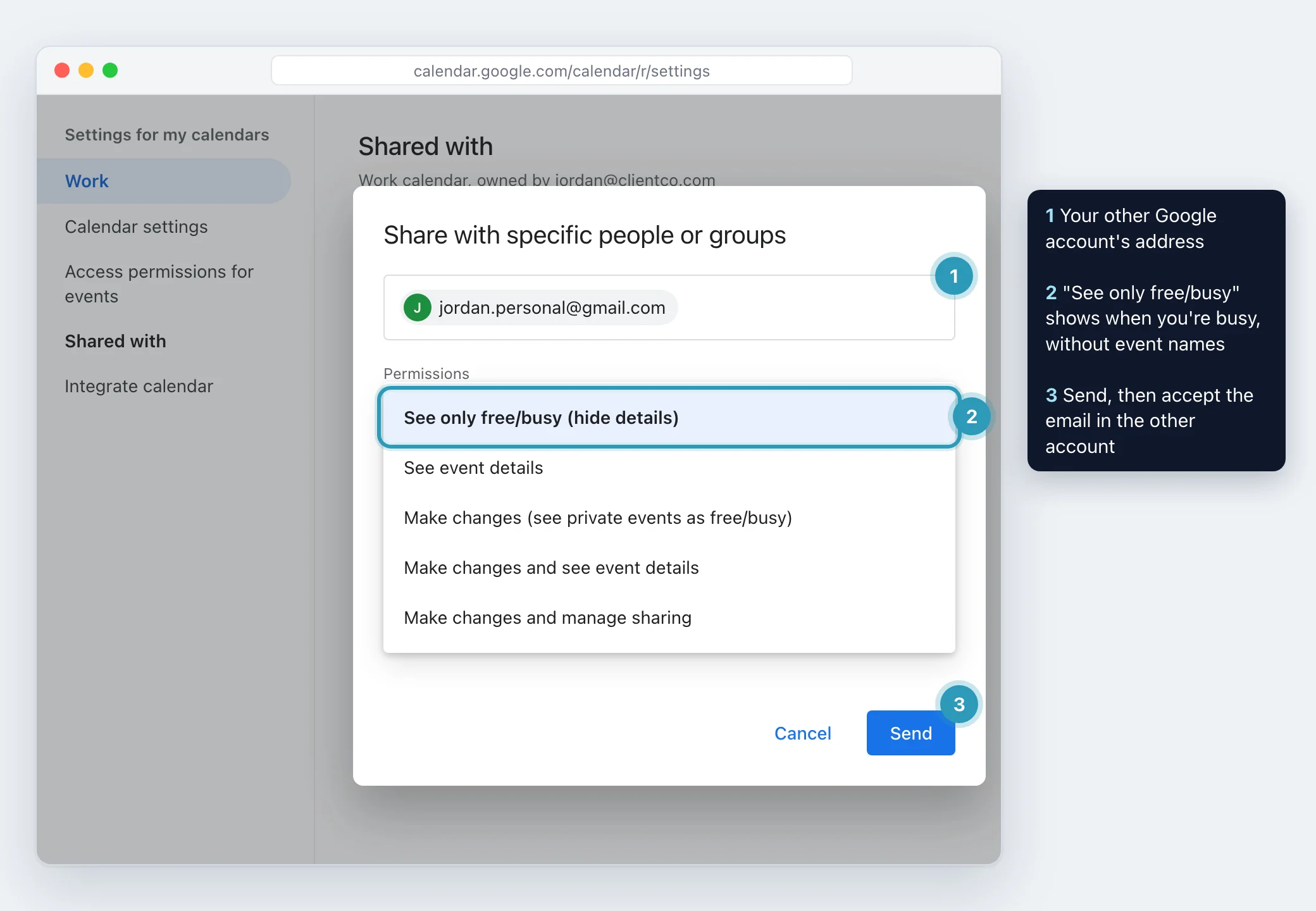
Sharing is the closest thing Google Calendar has to merging two accounts. You share the calendar from account A with the address of account B, and it appears inside account B. Repeat in the other direction if you want both accounts to see each other.
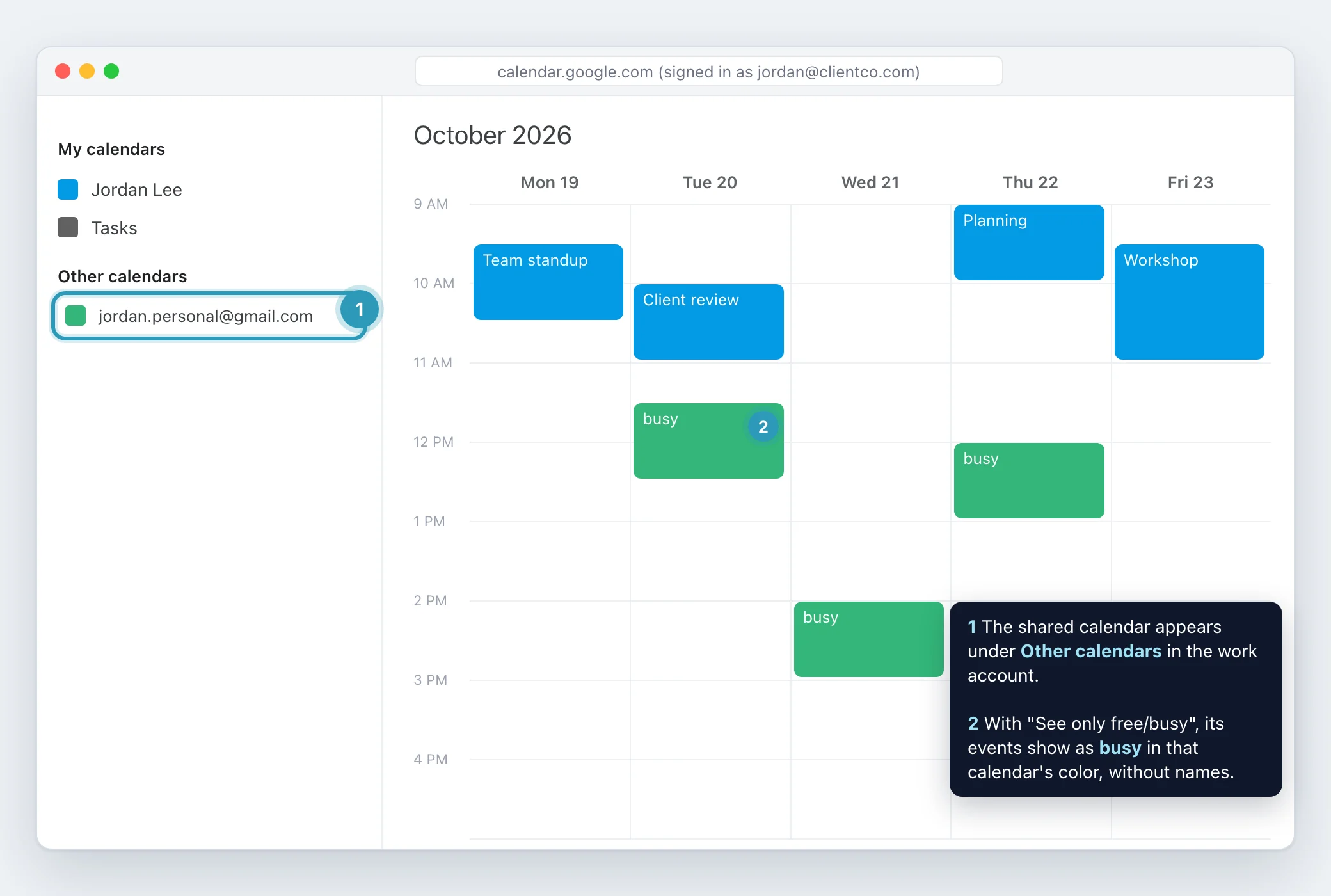
You can also start from the account that wants to see the calendar. In Google Calendar on a computer, next to Other calendars, click Add other calendars, then Subscribe to calendar, and enter the other account's address. If the calendar isn't shared with you yet, the owner gets an email asking to grant access. You can't subscribe to a new calendar from the Android, iPhone or iPad app, but once it is approved it shows up there.
If your aim is simply to keep different kinds of events apart inside one account, you don't need a second account at all. Google Calendar lets you create extra calendars in the same account from a browser, under Other calendars, then Create new calendar.
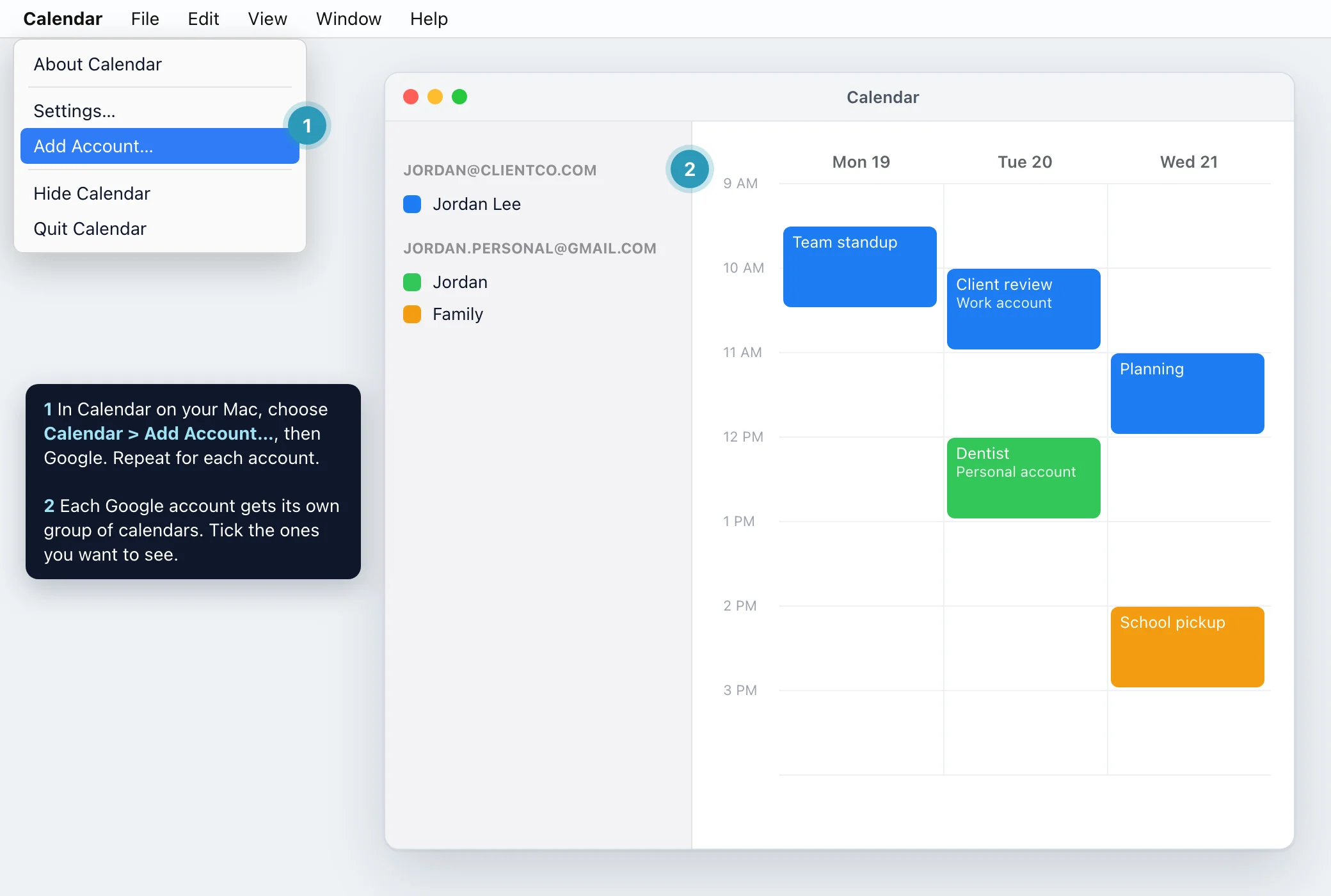
If you only need to see everything in one place, add each Google account to Apple Calendar. This doesn't share anything between the accounts. It only changes your own view.
On a Mac, open Calendar, choose Calendar, then Add Account, select Google and sign in. Repeat for each account. On iPhone or iPad, open Settings, tap Calendar, then Accounts, Add Account, Google, and turn on Calendars for that account.
Only the calendars under My calendars in Google sync to Apple Calendar by default. If a calendar someone shared with you is missing, open Google's Calendar sync page, tick the calendars you want, save, and refresh Apple Calendar.
With a work or school Google account, your administrator decides whether you can share your calendar, and how much an outside account can see. Google Workspace lets administrators limit external sharing of primary calendars to free/busy information only, or allow full details. If the share or the subscription request fails, that setting is the usual reason, and only your administrator can change it.
Google also notes that administrators can have permission to find your calendar and its event details even if you haven't shared it. Keep that in mind before sharing a client calendar into an employer account, or the other way round.
Sharing or subscribing is enough when you mainly want to see your day in one place, when both accounts allow sharing with each other, and when you are comfortable with the access level you chose.
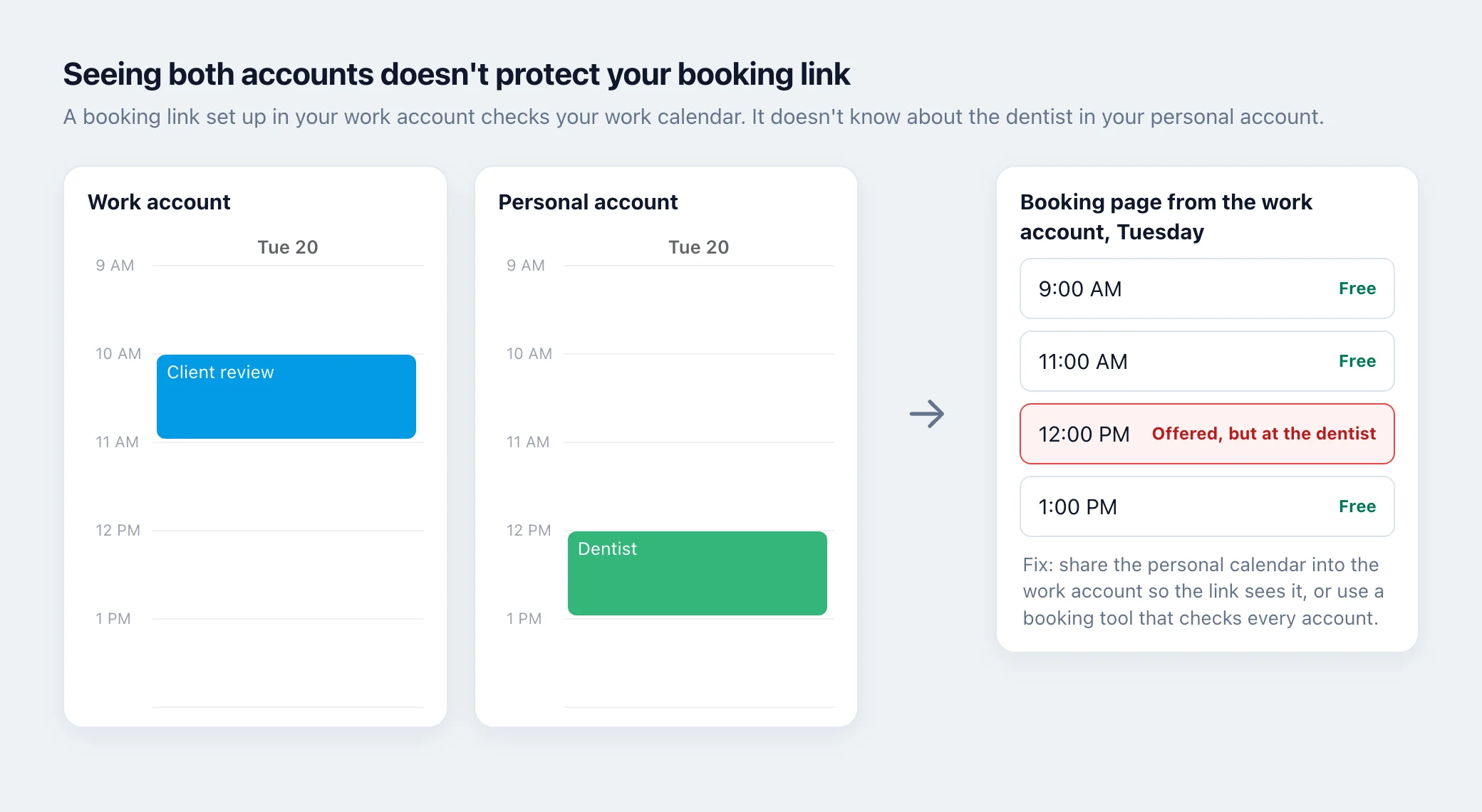
It stops being enough in three situations. People book you through a booking link, and that link needs to respect meetings held in a different account. An employer or client account won't let you share outside the organization. Or colleagues who schedule from one account need to see that you are busy because of a meeting in another account, without being given access to that other calendar.
How do I link one Google Calendar to another? Share the calendar from the account that owns it with the address of your other account, then accept the email in that account. It appears under Other calendars.
Can I share my Google Calendar with another account? Yes, from Settings and sharing in Google Calendar on a computer. Choose See only free/busy (hide details) if the other account should see only when you are busy. Work and school accounts may limit this.
How can I view multiple accounts in Google Calendar? Share or subscribe so each account's calendar shows inside one account, or add every account to Apple Calendar on your Mac or iPhone.
Can I have more than one calendar in one Google account? Yes. Create extra calendars from a browser under Other calendars, then Create new calendar.
Is there a Google Calendar sync app, or a free sync tool? Google's own sharing and subscribing are free and don't copy events. Tools that copy events between accounts come from other companies, so check each one's price and what details it copies before connecting a client account.
Why isn't my shared Google Calendar showing up or syncing? Check that the other account clicked the link in the sharing email, that your administrator allows sharing outside the organization, and, for Apple Calendar on iPhone or Mac, that the calendar is ticked on Google's Calendar sync page.
Does Meetingpad read my event titles to check availability? No. To check availability for booking links, Meetingpad reads busy times only, not event titles.
What is Meetingpad's combined calendar link? A private calendar address that shows the meetings from every connected account once. You can subscribe to it in Mac Calendar, Outlook, Google Calendar or Apple Calendar on iPhone. Anyone with the link can see each meeting's title, time, location and video link, so keep it to yourself and share a booking link instead.
How does calendar blocking work in Meetingpad? It is off until you turn it on in Settings, Accounts, Calendar blocking. Then a meeting in one account adds a private event titled Blocked at the same time on your other connected Google calendars, so people who schedule from those accounts see that you are busy. The Blocked event doesn't show the meeting's title, and blocking runs on Meetingpad's server, so it keeps working while your computer is asleep.
Meetingpad is a desktop app that checks your busy times across every Google account you connect, so a time that's taken in one account isn't offered on a booking link from another.